
What Is a Digital Business Card
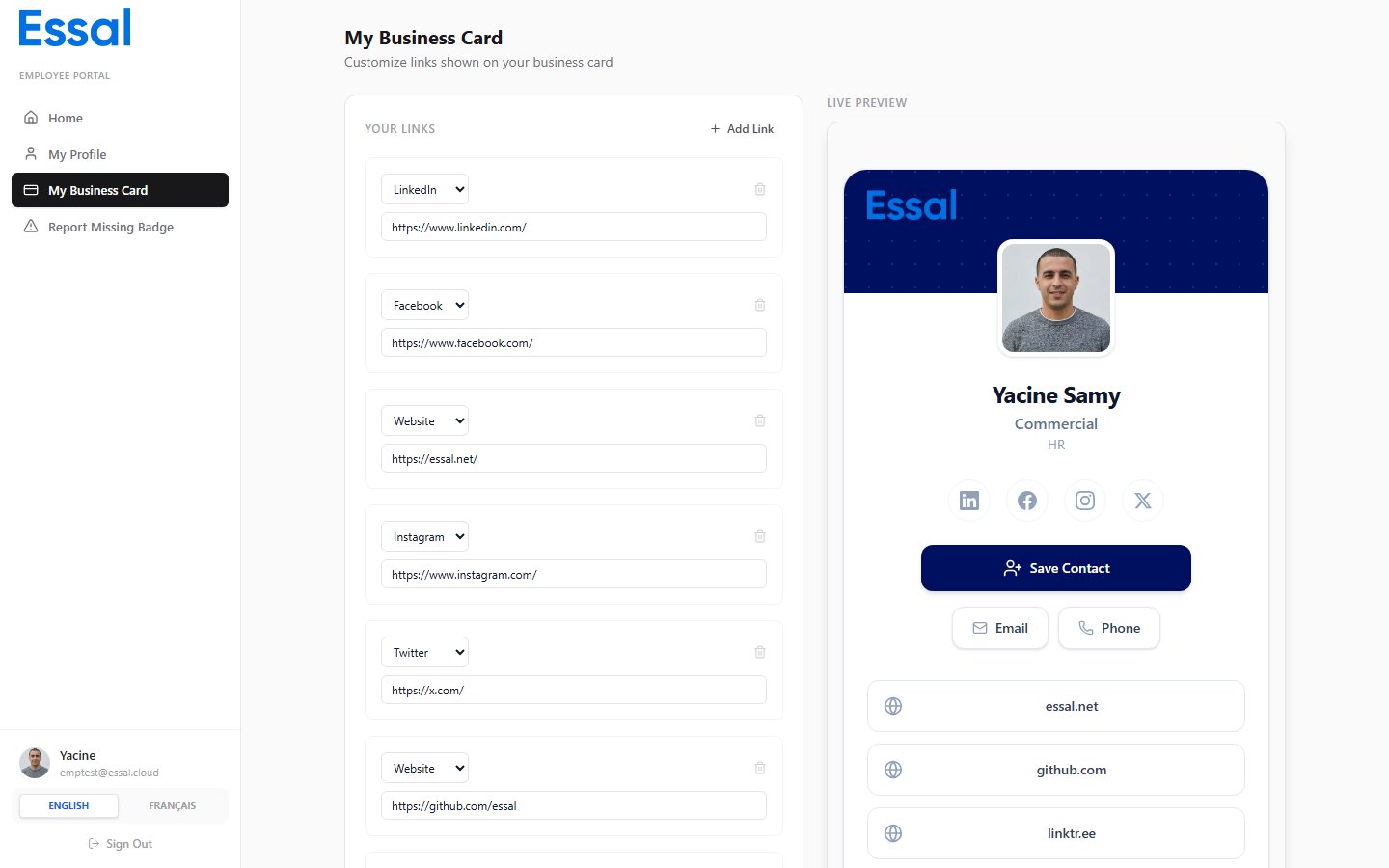
Your digital business card is a shareable page that displays your professional details — name, role, department, contact information, bio, and any custom links you add. It can be shared via a link or accessed through your badge’s QR code.Editing Custom Links
The left panel of the business card page contains the links editor.Adding a Link
- Select a Type from the dropdown:
- Website
- Twitter / X
- Custom
- Enter the full URL in the URL field.
- If you chose Custom, enter a Label that describes the link.
- Click Add to add the link to your card.
Removing a Link
Click the remove (×) button next to any link to delete it from your card.Saving
Click Save to apply your changes. Updates are reflected immediately in the preview and on your live business card.Live Preview
The right panel shows a real-time preview of your business card. It updates as you make changes. Your card displays:- Cover section with your company’s brand colour
- Company logo and your profile photo
- Your full name, job title, and department
- Social media icons for any social links you have added
- Save Contact button — downloads a vCard so people can save your details to their phone
- Email and Call buttons (if your email and phone are on file)
- Any custom links you have added
- Your bio